Sunday, February 9, 2020

A picture is worth a thousand words


At present, an image, whether fixed or moving, is the fundamental piece of any project where something is meant to be said, even without the text. Such is the importance of the pictures in today's world; and even more its quality!

Image result for how do you say una imagen vale mas que mil palabras in English?
https://icons.iconarchive.com/icons/martin-berube/square-animal/256/Horse-icon.png
   
vs
Image result for horse desert
https://posterfoundry.com/wild-chesnut-draft-horse-running-photo-art-print-poster-12x18/

In this way, the images we take or access from the internet are not the same, beyond their size and resolution. There are many image formats, and all of them have a specific purpose. Although it appears to be the same, an image for a ready-to-print logo is not and can not be the same as a web-prepared image.

Images and digital files

There are file formats that can be manipulated by any sort of editing application and pictures, such as JPG, PNG, GIF, to name a few, that is, we won't need a specific software to be able to use them, as all editing applications have help to be able to work with this type of images.
Related image
https://ignitiondrawing.blog/2018/05/29/what-is-the-difference-between-a-jpg-png-and-gif/

Which one is the best?

In the article Solved - Best Image Format for the Web? PNG, JPG, GIF, and SVG you can read about you the different image formats. Maybe this chart can help you:
https://www.pagecloud.com/blog/web-images-png-vs-jpg-vs-gif-vs-svg


Although there are some applications on the market that can carry out this task, such as the exceptional Gimp, a free and free photo retouching software, the truth is that we always run the risk that the information contained in the PSD file will not be properly interpreted, so we will be facing a safe disaster.

Some recommendations to use images successfully:


  • Catch the attention: with them, you will be able to capture your readers ' attention, entertain them, and eventually get them more interested in your story.
  • Easy reading: you will be able to ease the reading of any of your readers so that the information gathering process is much more enjoyable.
  • Learn and Teach: Thanks to the use of images such as infographics, your readers will be able to capture your article's message much better and apply the information learned much more effectively.
  • Beauty and quality: an article with quality images can make a leap in quality by obtaining a much more professional appearance.
  • Improving Positioning

My favorite image formatting apps:

herramienta imágenes Gimp

Gimp a free software that will allow you to easily retouch your pictures, producing more than satisfactory results. This powerful tool has become an alternative to Photoshop whose number of followers rises day by day.

Among many of its features stand out:

  • pick all types of shapes
  • Smart Scissors for cutting 
  • Error Correction 
  • Editing Tools 
  • Filters 
  • Possibility to export files in all types of formats (jpg, png, gif, svg, etc...)


herramienta para reducir dimensiones de imágenes Pixlr

Pixlr is an online editor whose main goal is to be able to perform simple touch-ups to customize our images in just a couple of seconds.

Pixlr currently has four software to use depending on the interface from which you are accessing them (computer or smartphone)

Digital image banks

- freepik.com - I have a membership
- dreamstime.com
- openphoto.net
- cepolina.com has pictures from all over the world.
- amgmedia.com is well known by teachers.
- imagefree.com
 
Be fun and creative!!! ;)

We have some questions (for our assignment), do you want to be part of our learning process? Here you are...

  1. What adventure did you complete?
  2. What did you learn that was new to you? Please be specific about the skills and knowledge you learned in this adventure.
  3. How will you use these skills in your teaching?
  4. What questions do you still have about this content?
  5. Where will you go from here? How will you get there?

Friday, February 7, 2020

Effective Infographics step by step


What are Infographics? 

Infographics are a visual representation that includes maps, charts, graphs and diagrams that allow simple, complex concepts to be communicated.

Why use infographics?


  • Analysis presentation: helps to better understand the information presented thanks to visual support, schematization, and organization skills.
  • Content resource: a good way to explain content and information of the subject or lesson. 
  • Motivation: Learning becomes more enjoyable and easier 
  • Social media and learning: infographics create greater participation (interaction) in social networks, increasing the visibility of the message in the online environment.
  • We humanize material: content that is more affable and familiar as it is easily understood.
  • We help us remember: we have a tendency to recall more what we see than what we hear.


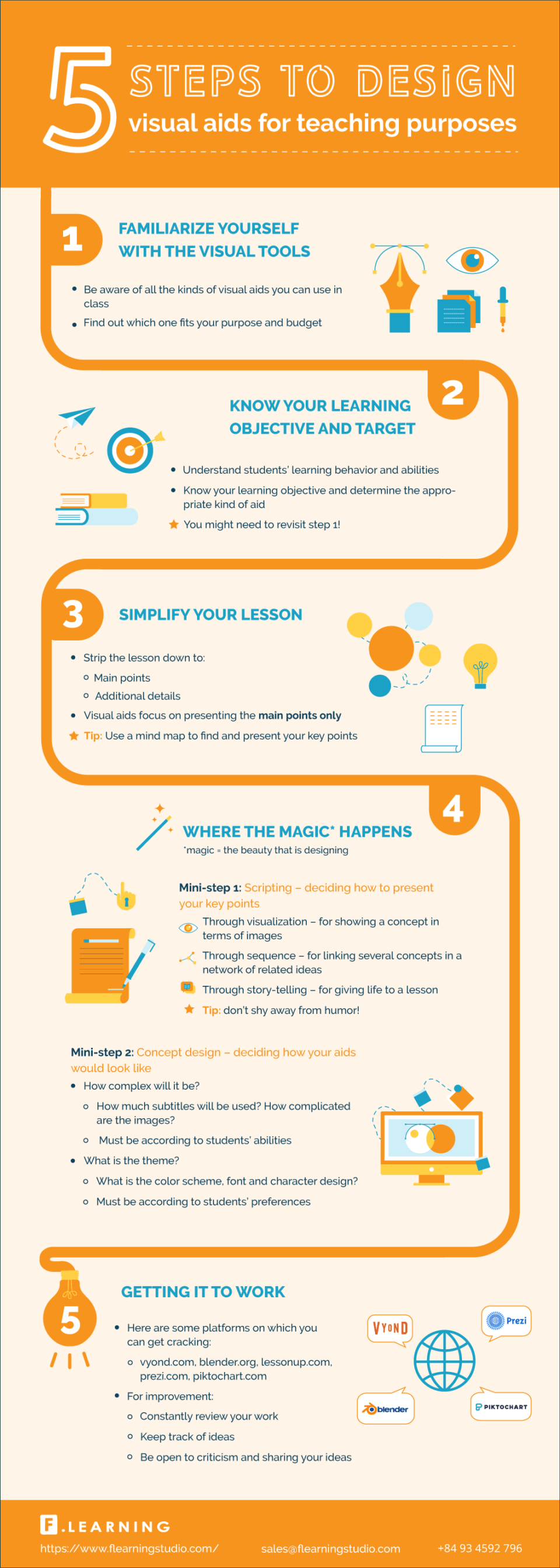
An example of the use of infographics:


How To Design Visual Aids For Teaching Purposes />

Retrieved from https://elearninginfographics.com/design-visual-aids-for-teaching-purposes/

Infographic design

Be careful with all these factors while designing your infographics:


  1. Be creative: copying graphic ideas from other infographics should be avoided.
  2. Text & Pictures: Graphically, an infographic should be rich avoiding building it with a lot of text.
  3. Color: Effective contrast colors should be used to encourage reading. An outstanding color selection method is color.adobe.com
  4. Fonts: An infographic should have a creative use of fonts and letter sizes. The Dafont.com site contains a wide variety of sources that can be used as a reference.
  5. Icons: An infographic will include basic symbols (icons) in order to communicate properly. The Iconarchive.com site has very good material.


Tools for making infographics

The main free tools for creating infographic elements:

- PiktoChart is a web tool that allows you to create beautiful infographics from a few models and artifacts that are added with a quick drag and drop. It allows you to customize colors and fonts in just a click, being very easy to use. The free option is a bit limited but it allows you to make easy infographics.

How To Create a Piktochart Infographic Easily

- Canva is a software tool that allows people who are not designers to design and create images for the Web. It has free templates to develop infographics easily.


How To Create Infographics (The Ultra-Simple & Easy Way)

Sunday, February 2, 2020

Mindmaps

Why use mind maps?

To get the most efficient and full research cycle possible, you can surround yourself with the best network advantages of the online educational tools. One of the most useful, certainly, are mind maps, with which you can easily create visually appealing schemes that will stimulate your imagination. You will receive the following benefits in the study with this resource:
  • Link various syllabus concepts and research areas 
  • Organize your tasks or study lessons on different subjects
  • Bring the content you need to learn into perspective
By making a mind map you can link and envision ideas to help you understand the study agenda more easily. And the best thing is that you can use this tool for free and at no expense whatsoever. Check it out and you'll see how the research process gets enhanced when you have good fingertip training material.
I tried to organize my ideas of my research on social media and family involvement:

https://www.mindmeister.com/1410020405/social-media-and-low-ses-latino-family-involvement-in-early-childhood-education-1
What do you think?
I think that it helps you organize your ideas. I really like the option of the presentation. There are different options to share with your team or just share a link for others to see it.

Intuitive and simple.         
                                                                                     

To design and create a mind map with mindmeister is so easy and intuitive. Just follow some simple steps:
1. Choose which subject you want to discuss and start filling the nodes with the learning concepts.
2. It won't take you more than a couple of minutes to take the entire study material into context and easily connect each idea.
3. Once you have visually captured all the study, you can add some audio-visual support that you will help your students understand the whole lesson efficiently.
Picture

Significant learning and visual support.
If you think about it, you will realize that learning is connecting ideas. There are times, however, that it is complicated to arrange all our thoughts and find a conductor thread among them. In these cases, Mindmeister is perfect for retaining information and organizing the different sections of the topic you need to study. They also manage to enhance your creativity and imagination to unsuspected limits.

As you create your map, you will see how your study material begins to make more sense and become easier than you thought.

Sunday, January 26, 2020

Gathering Student Input through Technology


21st-Century Teachers incorporate Student Input & Gather Feedback


Many applications allow students to provide live and online feedback.

- Google Forms (Survey) and PollEverywhere are two of many apps that make it quick and easy to create simple polls that enable teachers to gather input or feedback from students. They can vote in those surveys with the use of a digital device, we know how much they love using technology in class.
- Socrative is another free app that allows teachers to go far beyond basic polls to get more complex quizzes, or just use it to quickly and easily get feedback.

Some experience of my class and presentations:

GOOGLE FORMS - SURVEY
how-to-use-google-forms-in-2018

As I mentioned before in one of the comments, I used surveys from Google forms like the ones I offered at the end of one of my workshop-presentations for teachers: https://docs.google.com/forms/d/e/1FAIpQLSejT_NGyPZPDIf6loI-WZQ75-l0y8trNxiizJPdmzAkc9dcdQ/viewform?usp=sf_link

The title of the presentation is "Words can talk: An innovative use of technology in Shared-Book Reading". There, the participants learned about the use of Augmented Reality in a Spanish class for Prek students to develop biliteracy. At the end of the presentation, with a QR code linked to the survey, the audience could scan it and answer the questions related to the content of the presentation and their interest of using this kind of technology. Previously, I showed only the QR codes, but after having some problems with the QR scan apps and added the short url link just under the code. Another problem I faced was that not all the participants were familiar with QR scan apps, so before the presentation, I invited them to download this kind of apps. On the walls or flyers delivered to the participants, I included a brief explanation step by step about how to download it.

The google forms are intuitive and easy to fill, most of the participants found them easy to answer. Once everyone answered the survey I could see the results and some graphics.


KAHOOT!

Image result for kahoot

Kahoot! is a fun and interactive way to help your students learn. With the concept of gamification in your classroom, learning is fun, just like playing.

When working with my Dual-Language Spanish Pre-K students we were learning vocabulary with this tool. First, the vocabulary was introduced in the "word wall" to the whole class. Then, we set some ABC stations to practice learning with oral and written skill development. In small groups, one way to check understanding and their language skills was with Kahoot! Three or four students were sitting with me in the small group table, I helped them use the app. I was granted with some tablets to help students develop learning experiences and 21st-Century skills, that is why every student had the chance to use digital devices during class. They typed the code: 2402990 and we started the activity.

The challenges I faced in the very beginning was that most of the students were not familiar with the app, and I needed to spend some time explaining and practicing for weeks. One of our gifts as Prek teachers: PATIENCE. After several weeks, they learned how to use it and they really enjoyed learning with Kahoot!. After some time using the app, I found some other ways to improve learning with this app. For example, when some students failed the answers I invited all of them to find the answer in the classroom, so in this way, they were physically active during the activity. Depending on their level, I invited them to explore the room and find the answer. Therefore, they were developing other skills like "learning by discovery", communication, physical development, social skills...

I do not want to generalize, but many educators in Early Childhood Education do not like using technology as part of the learning process. However, I found technology as a motivating component and tool of their learning process. In addition, parents are invited to use Kahoot! too and use the activities we are using in class to practice at home.

Tuesday, January 21, 2020

GUIDE FOR THE DEVELOPMENT OF LANGUAGE EDUCATION POLICIES IN EUROPE Chapter 5: Creating a culture of plurilingualism ENSEMBLE workshop ECML, Graz, ppt download

GUIDE FOR THE DEVELOPMENT OF LANGUAGE EDUCATION POLICIES IN EUROPE Chapter 5: Creating a culture of plurilingualism ENSEMBLE workshop ECML, Graz, ppt download: Creating a culture of plurilingualism l How can we –promote plurilingual education? –show its political, social and educational relevance? –make it feasible? l No need to start from scratch l But need to rethink teaching objectives

EDUCATION IN A MULTILINGUAL SOCIETY POLICY FOR DEVELOPING SECOND AND THIRD LANGUAGES AS MEDIA FOR LEARNING.

Jsp UNIT 2. EDUCATION IN A MULTILINGUAL SOCIETY POLICY FOR DEVELOPING SECOND AND THIRD LANGUAGES AS MEDIA FOR LEARNING. - ppt download: jsp WARM UP WHAT DO YOU THINK ABOUT THE ASSUMPTION THAT LEARNING DIFFERENT LANGUAGES HAS BECAME A NEED IN ORDER TO AVOID SOCIAL EXCLUSION?

MULTILINGUAL EDUCATION IN EUROPE

PLURILINGUAL EDUCATION IN EUROPE Promotion of plurilingual education as a value and competence. Plurilingualism: the ability to use several languages for. - ppt download: PROMOTING PLURILINGUALISM Some desirable actions to promote plurilingualism can be the following: –To enhance the status and development of linguistic repertoires considered as the linguistic varieties (languages) –Developing pluricultural awareness and intercultural communication. –Educating for democratic citizenship in Europe.