Friday, March 20, 2020
Corona virus y la enseñanza a distancia
Desde que empezaron las noticias sobre la expansión del virus Covid-19 por todo el mundo, las escuelas empezaron a cerrar sus aulas y abrir sus pantallas. El cierre abrupto de las escuelas fue un cambio brusco en el proceso de enseñanza-aprendizaje.
La enseñanza a distancia es una forma de distancia social. De hecho, es una de las mejores formas de detener la expansión del coronavirus y tenerlo bajo control. Sin embargo, esta distancia puede llegar a ser un obstáculo.
Enseñanza en red para todos.
La enseñanza a distancia a través de los dispositivos tecnológicos, conocido por el término anglosajón "e-learning", ha traido muchos cambios a nuestros "deberes" diarios. Para los que ya hicimos estudios online en el pasado esto no es más que una continuación de lo ya vivido. Para otros, muchos, es un reto, un desafío al que sacarle el mejor partido posible en el menor tiempo posible, sus estudiantes y sus familias les esperan.
Ms Castaneda es una antigua compañera de trabajo, maestra de educación primaria. A diario Ms. C. usa su computadora para acceder a los recursos en linea ya sea para poner canciones, videos u otros recursos audiovisuales que apoyan su lección. En ocasiones, publica alguna foto en las redes sociales e intenta comunicarse con sus familias a través de este medio. Siempre hay alguna queja del uso de redes sociales o comunicación digital por parte de alguna familia, pero es parte de nuestro proceso docente.
Sigue tu ritmo, pon límites.
Al igual que en la escuela, tanto docentes como estudiantes tenemos un horario que cumplir. Hay muchos horarios circulando por la red que les pueden servir de ayuda o de inspiración. Tener un horario o calendario con las tareas a hacer nos ayudará a organizanos nuestro tiempo. De hecho, el no tener un horario puede dar la sensación de tener que estar ocupado o trabajando las 24 horas. ¿Qué ocurre después? El síndrome de "burnout". Esta sensación no solo afecta a los docentes, con la idea de que tienen que compartir todas las ideas que encuentren interesantes en Internet con decenas de actividades; o los estudiantes, que si no se organizan pueden estar haciendo la tarea hasta la hora de la cena, con lo que afecta al resto de sus familias.
Comunicación y más comunicación.
Establecer una comunicación fluida con los estudiantes y con los docentes es la mejor manera de que todo salga bien. Las familias conocen a sus hijos/as pero no como estudiantes de escuela, ya que allí hay normas, horarios, y muchas más cosas que influyen sus vidas académicas. En casa, las familias deben informarse y comprender este hecho, al igual que un trabajo, el estudio requiere de unas condiciones para que todo salga bien, y sobre todo constancia.
La comunicación del equipo docente es vital. Un consenso en el programa de actuación es muy importante, ya que ayudará a los estudiantes y familias a reducir su posible frustración por ejemplo si un docente envía muchas más actividades o lecturas que sus compañeros/as.
En este proceso hay pros y contras, como en todo, pero a pesar de la distancia estamos todos conectados. Aprovecha tus medios de información y comunicación para preguntar y resolver tus dudas, TODAS. En definitiva hay algo que no cambia, la misión de las familias y escuelas CONTINÚA siendo la misma, el éxito personal y profesional para todos los estudiantes.
Recursos virtuales GRATIS
¡Recursos virtuales GRATIS!
Entre todos juntos podremos superarlo sin dejar de aprender en casa.
Durante el confinamiento o aislamiento por el COVID-19 (o coronavirus), la mayoría de las escuelas cerrados. Como educador siento la necesidad de ayudar, aunque sea con poco, a las familias y los docentes que buscan ayuda. A nivel profesional educativo, los docentes tienen la tarea de descubrir nuevas formas de desarrollar su actividad, cómo hacer sus lecciones y actividades a distancia para sus estudiantes. Las familias y tutores legales, desde sus hogares, tratan de ayudar a sus hijos/as con sus estudios. Por esta razón les comparto una lista de recursos virtuales educativos, a los que podrán acceder desde sus dispositivos móviles digitales o computadores y ordenadores.¡Disfruten y aprendan!
Niveles de Educación Infantil y Primaria
ABCMouseEs una web y app de aprendizaje que incluye lecciones, actividades, canciones, lecturas y otros recursos y materiales para todas las asignaturas de Educación Infantil y Primaria.
Adventure Academy
De los creadores de ABCMouse nace esta web con recursos y actividades para todas las asignatures para estudiantes de 8 a 13 años.
ReadingIQ
Es una biblioteca en tu bolsillo, bueno en celular o tableta ;)
Aquí podrás encontrar lecturas para todas las edades y para todos los gustos. No hay excusas para no leer.
Reading A-Z
Al igual que la web anterior aquí podrás encontrar miles de lecturas para todos los niveles, además hay fichas de trabajo con divertidas actividades.
Learning A-Z
Con miles de recursos y actividades para aprender de la mejor manera, divirtiéndose.
Boddle
Boddle tiene miles de actividades y juegos matemáticos.
BrainPOP y BrainPopJr
Tienen muchos recursos como videos, lecturas, juegos y preguntas, e incluso para "programación-coding". BrainPOPJr es para los más jóvenes ;)
BreakoutEDU
Esta web tiene muchos juegos online que tanto gustan a nuestros estudiantes, incluso hay algunos "escape rooms". Creo que es una buena manera de hacer una pausa si tus hijos/as leen o ven videos por mucho tiempo.
TeachersPayTeachers
Es una web a la carta, aquí puedes encontrar lo que estás buscando. Usas la barra de búsqueda y seleccionas el curso/grado y aparecerán muchos recursos, actividades,... Además si valoras las actividades o recursos descargados TpT te premia.
Create tu perfil y empieza a ayudar a tus peques en casa con lo que necesitan.
¡Hay muchas actividades y recursos GRATIS!
¡IMPORTANTE! Pregunta a tu director/a - principal si la escuela tiene cuenta con TpT porque la escuela puede pedir los recursos a través de los maestros/as.
¡IMPORTANTE! Pregunta a tu maestro/a si la escuela tiene cuenta con TpT porque la escuela puede pedir los recursos a través del director/a - principal.
Carrot-TOP
Es una web con recursos para docentes norteamericanos.
Search Results
Web Result with Site Links
Web de recursos para docentes.
CreositySpaces products make STEM current, real and relatable for students and teachers by connecting them to STEM through entrepreneurship.
Search Results
Web Result with Site Links
EDHelper
EdHelper es un servicio en línea que proporciona hojas de trabajo imprimibles para maestros y padres de educación en el hogar.
Sunday, February 23, 2020
Infographic: visual academic report card
My ePortfolio post: https://userogonzalez.weebly.com/infographic
Visual academic reports

This week we learned how to create infographic. As a former dual-language PreK teacher I was interested in finding the outcomes of English and Spanish language students in HISD enrolled in the HIPPY program.
After following the instructions, I found this report with the outcomes by CIRCLE assessment during 2017-2018.
To create this final image, I used PowerPoint. With the information from the report I edited all the images, especially I modified them with transparency option. To blend the chart with another picture related to this topic I selected a picture from freepik.com (a royalty-free image website).
With the image options I edited the graph colors to make them more prominent and the image from freepik a bit transparent to let the data be read.
To create the image, I copied and pasted the screenshot of the slide 3 to Paint and I saved the image in a JPEG file.
Visual academic reports

This week we learned how to create infographic. As a former dual-language PreK teacher I was interested in finding the outcomes of English and Spanish language students in HISD enrolled in the HIPPY program.
After following the instructions, I found this report with the outcomes by CIRCLE assessment during 2017-2018.
To create this final image, I used PowerPoint. With the information from the report I edited all the images, especially I modified them with transparency option. To blend the chart with another picture related to this topic I selected a picture from freepik.com (a royalty-free image website).
With the image options I edited the graph colors to make them more prominent and the image from freepik a bit transparent to let the data be read.
To create the image, I copied and pasted the screenshot of the slide 3 to Paint and I saved the image in a JPEG file.
Saturday, February 15, 2020
Sunday, February 9, 2020
A picture is worth a thousand words
At present, an image, whether fixed or moving, is the fundamental piece of any project where something is meant to be said, even without the text. Such is the importance of the pictures in today's world; and even more its quality!
| https://icons.iconarchive.com/icons/martin-berube/square-animal/256/Horse-icon.png |
vs
| https://posterfoundry.com/wild-chesnut-draft-horse-running-photo-art-print-poster-12x18/ |
In this way, the images we take or access from the internet are not the same, beyond their size and resolution. There are many image formats, and all of them have a specific purpose. Although it appears to be the same, an image for a ready-to-print logo is not and can not be the same as a web-prepared image.
Images and digital files
There are file formats that can be manipulated by any sort of editing application and pictures, such as JPG, PNG, GIF, to name a few, that is, we won't need a specific software to be able to use them, as all editing applications have help to be able to work with this type of images.
![]() |
| https://ignitiondrawing.blog/2018/05/29/what-is-the-difference-between-a-jpg-png-and-gif/ |
Which one is the best?
In the article Solved - Best Image Format for the Web? PNG, JPG, GIF, and SVG you can read about you the different image formats. Maybe this chart can help you:
![]() |
| https://www.pagecloud.com/blog/web-images-png-vs-jpg-vs-gif-vs-svg |
Although there are some applications on the market that can carry out this task, such as the exceptional Gimp, a free and free photo retouching software, the truth is that we always run the risk that the information contained in the PSD file will not be properly interpreted, so we will be facing a safe disaster.
Some recommendations to use images successfully:
- Catch the attention: with them, you will be able to capture your readers ' attention, entertain them, and eventually get them more interested in your story.
- Easy reading: you will be able to ease the reading of any of your readers so that the information gathering process is much more enjoyable.
- Learn and Teach: Thanks to the use of images such as infographics, your readers will be able to capture your article's message much better and apply the information learned much more effectively.
- Beauty and quality: an article with quality images can make a leap in quality by obtaining a much more professional appearance.
- Improving Positioning
My favorite image formatting apps:

Gimp a free software that will allow you to easily retouch your pictures, producing more than satisfactory results. This powerful tool has become an alternative to Photoshop whose number of followers rises day by day.
Among many of its features stand out:
- pick all types of shapes
- Smart Scissors for cutting
- Error Correction
- Editing Tools
- Filters
- Possibility to export files in all types of formats (jpg, png, gif, svg, etc...)

Pixlr is an online editor whose main goal is to be able to perform simple touch-ups to customize our images in just a couple of seconds.
Pixlr currently has four software to use depending on the interface from which you are accessing them (computer or smartphone)
Digital image banks
- freepik.com - I have a membership
- dreamstime.com
- openphoto.net
- cepolina.com has pictures from all over the world.
- amgmedia.com is well known by teachers.
- imagefree.com
Be fun and creative!!! ;)
We have some questions (for our assignment), do you want to be part of our learning process? Here you are...
- What adventure did you complete?
- What did you learn that was new to you? Please be specific about the skills and knowledge you learned in this adventure.
- How will you use these skills in your teaching?
- What questions do you still have about this content?
- Where will you go from here? How will you get there?
Friday, February 7, 2020
Effective Infographics step by step
What are Infographics?
Infographics are a visual representation that includes maps, charts, graphs and diagrams that allow simple, complex concepts to be communicated.
Why use infographics?
- Analysis presentation: helps to better understand the information presented thanks to visual support, schematization, and organization skills.
- Content resource: a good way to explain content and information of the subject or lesson.
- Motivation: Learning becomes more enjoyable and easier
- Social media and learning: infographics create greater participation (interaction) in social networks, increasing the visibility of the message in the online environment.
- We humanize material: content that is more affable and familiar as it is easily understood.
- We help us remember: we have a tendency to recall more what we see than what we hear.
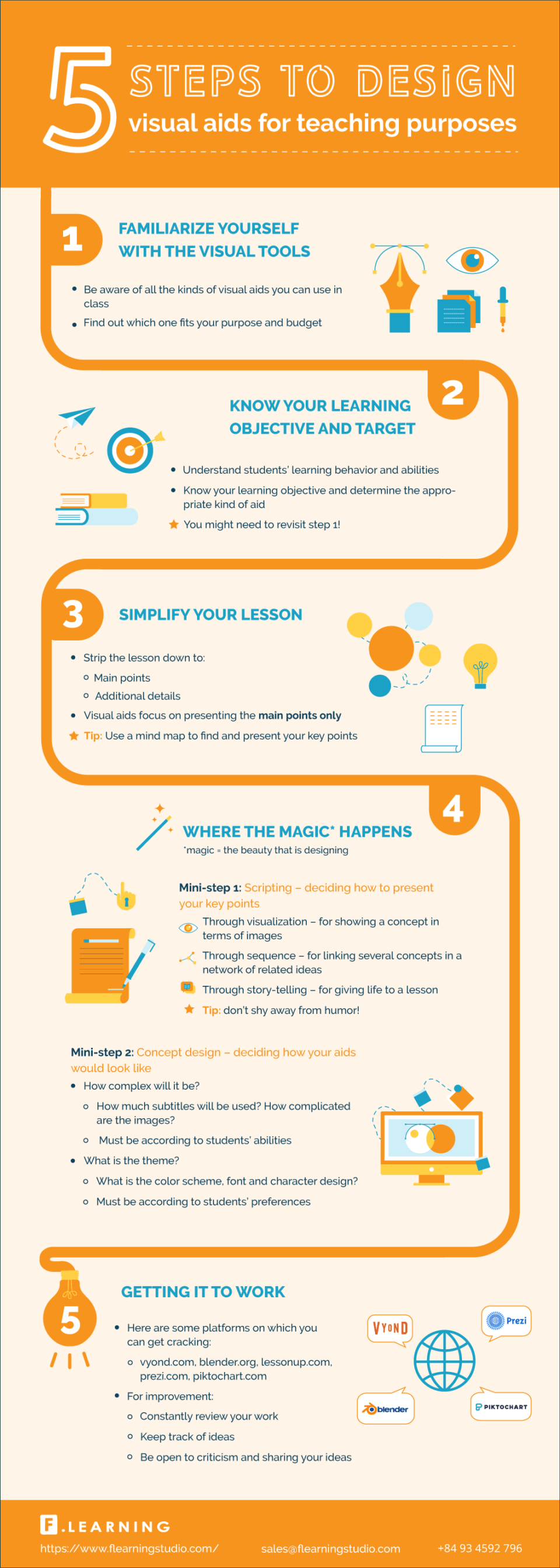
An example of the use of infographics:
/>Retrieved from https://elearninginfographics.com/design-visual-aids-for-teaching-purposes/
Infographic design
Be careful with all these factors while designing your infographics:
- Be creative: copying graphic ideas from other infographics should be avoided.
- Text & Pictures: Graphically, an infographic should be rich avoiding building it with a lot of text.
- Color: Effective contrast colors should be used to encourage reading. An outstanding color selection method is color.adobe.com
- Fonts: An infographic should have a creative use of fonts and letter sizes. The Dafont.com site contains a wide variety of sources that can be used as a reference.
- Icons: An infographic will include basic symbols (icons) in order to communicate properly. The Iconarchive.com site has very good material.
Tools for making infographics
The main free tools for creating infographic elements:
- PiktoChart is a web tool that allows you to create beautiful infographics from a few models and artifacts that are added with a quick drag and drop. It allows you to customize colors and fonts in just a click, being very easy to use. The free option is a bit limited but it allows you to make easy infographics.
How To Create a Piktochart Infographic Easily
- Canva is a software tool that allows people who are not designers to design and create images for the Web. It has free templates to develop infographics easily.
How To Create Infographics (The Ultra-Simple & Easy Way)
Sunday, February 2, 2020
Mindmaps
Why use mind maps?
To get the most efficient and full research cycle possible, you can surround yourself with the best network advantages of the online educational tools. One of the most useful, certainly, are mind maps, with which you can easily create visually appealing schemes that will stimulate your imagination. You will receive the following benefits in the study with this resource:
I tried to organize my ideas of my research on social media and family involvement:
https://www.mindmeister.com/1410020405/social-media-and-low-ses-latino-family-involvement-in-early-childhood-education-1
To get the most efficient and full research cycle possible, you can surround yourself with the best network advantages of the online educational tools. One of the most useful, certainly, are mind maps, with which you can easily create visually appealing schemes that will stimulate your imagination. You will receive the following benefits in the study with this resource:
- Link various syllabus concepts and research areas
- Organize your tasks or study lessons on different subjects
- Bring the content you need to learn into perspective
I tried to organize my ideas of my research on social media and family involvement:
https://www.mindmeister.com/1410020405/social-media-and-low-ses-latino-family-involvement-in-early-childhood-education-1
What do you think?
I think that it helps you organize your ideas. I really like the option of the presentation. There are different options to share with your team or just share a link for others to see it.
Intuitive and simple.
To design and create a mind map with mindmeister is so easy and intuitive. Just follow some simple steps:
1. Choose which subject you want to discuss and start filling the nodes with the learning concepts.
2. It won't take you more than a couple of minutes to take the entire study material into context and easily connect each idea.
3. Once you have visually captured all the study, you can add some audio-visual support that you will help your students understand the whole lesson efficiently.
I think that it helps you organize your ideas. I really like the option of the presentation. There are different options to share with your team or just share a link for others to see it.
Intuitive and simple.
To design and create a mind map with mindmeister is so easy and intuitive. Just follow some simple steps:
1. Choose which subject you want to discuss and start filling the nodes with the learning concepts.
2. It won't take you more than a couple of minutes to take the entire study material into context and easily connect each idea.
3. Once you have visually captured all the study, you can add some audio-visual support that you will help your students understand the whole lesson efficiently.
Significant learning and visual support.If you think about it, you will realize that learning is connecting ideas. There are times, however, that it is complicated to arrange all our thoughts and find a conductor thread among them. In these cases, Mindmeister is perfect for retaining information and organizing the different sections of the topic you need to study. They also manage to enhance your creativity and imagination to unsuspected limits.
As you create your map, you will see how your study material begins to make more sense and become easier than you thought.
Subscribe to:
Posts (Atom)


/blogmerge/cf67f56e-00e6-48c0-a1a4-31a8e3baf0de.jpeg)